
Package Tracker - pkge Mobile
DARADDO APPS LTDBusiness
3.02.39K Reviews
- Version
- 20.1.2
- Installs
- 5.00M
- Age Rating
- Everyone
Screenshots
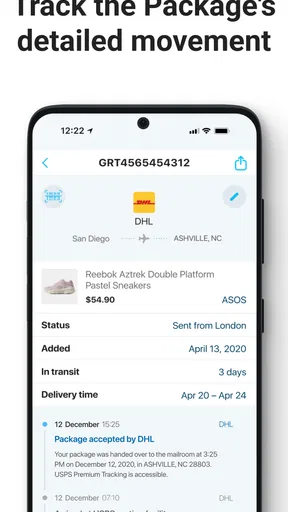
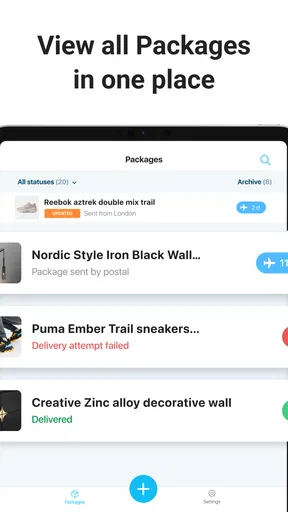
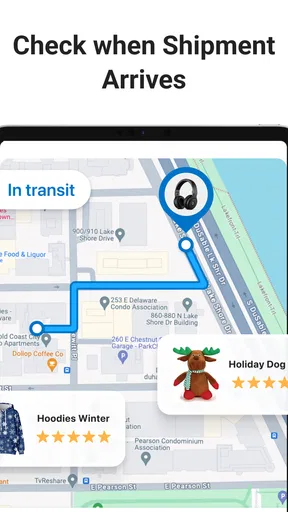
Our Review of Package Tracker - pkge Mobile
 Analysis by Appyee
I tend to notice how much time package tracking can consume only when several orders are on the move at once. I open one carrier’s page, search for another tracking email, then try to remember which delivery is due first. Package Tracker - pkge Mobile is designed to bring that checking into one place, which is the part I find most useful: less hunting around, and a clearer view of what I am waiting for.
That central view matters most when a delivery affects the rest of my day. I may need to be home for a parcel, plan a business handoff, or simply decide whether to keep checking for movement. The app is a free business-category tool from DARADDO APPS LTD, with optional in-app purchases. Its focus is practical rather than elaborate: keep an eye on shipments associated with major carriers such as FedEx, USPS, UPS, and DHL.
One place to follow shipments
The main appeal is the ability to follow packages from multiple carriers without treating each shipment as a separate task. A tracking number is the starting point; after adding it, I can check progress from within the app instead of repeatedly switching between carrier sites. That can be especially handy for a household where different people order from different retailers, or for a small seller keeping an eye on outgoing parcels alongside personal purchases.
A shared tracking view is not the same as control over a delivery. The carrier remains the source of the parcel’s actual journey, and a tracker is most useful as a convenient window onto status changes, not as a guarantee that a scan will appear the instant something happens. I would still use the carrier’s own service for a delivery problem that needs a specific answer or action.
The Experience of Tracking with Ease
First things first, downloading Package Tracker - pkge Mobile was a breeze. Available on both Android and iOS, the app installs quickly and is ready to go in seconds. Once you open it, you’re greeted with a clean and user-friendly interface. No unnecessary bells and whistles, just what you need to keep track of your packages.
Adding a package is straightforward. You simply enter the tracking number, and the app takes care of the rest. It supports a wide range of couriers, so whether you're waiting for a local delivery or an international one, you’re covered. I tried it with several packages from different services, and it didn't miss a beat.
Features that Make a Difference
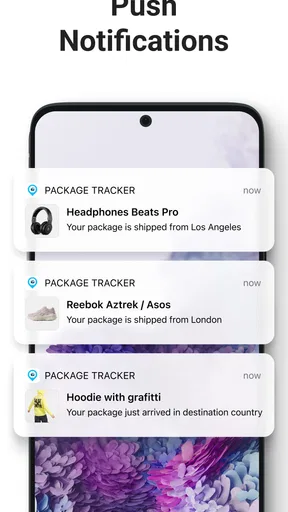
One of the standout features of pkge Mobile is the push notifications. Instead of constantly checking the app, it sends you real-time updates straight to your phone. I loved getting notified the moment my package was out for delivery. It’s like having a personal assistant keeping an eye on things for you.
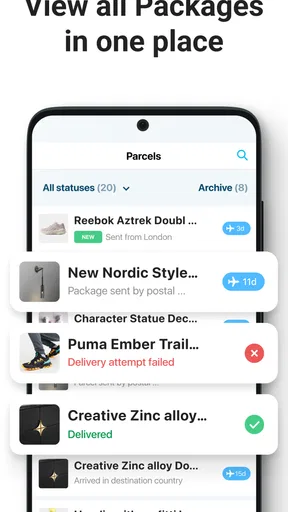
Another feature that caught my attention is the ability to track multiple packages simultaneously. You can see all your shipments in one place, with each one clearly marked with the expected delivery date. It’s perfect for those of us who might have a dozen things on the way at any given time.
What a busy delivery day looks like
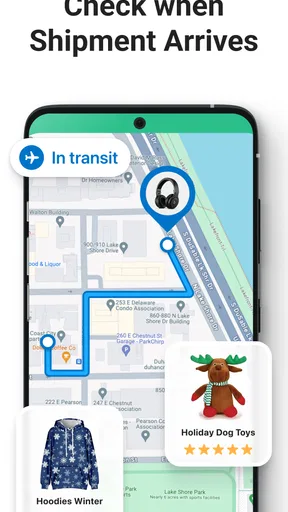
Imagine I have a work parcel due at home, a personal order that is still travelling, and something I have sent to a customer. A single tracker view can help me sort out which shipment deserves attention first. If the work parcel is marked as out for delivery, I can make a practical decision about staying nearby; the other two can wait until their status changes. This is a small convenience, but it replaces a string of separate checks with one quick scan.
For a small business, that overview can help with routine coordination, especially when a customer asks whether an order has moved. I can check the latest status before replying rather than relying on memory or searching through old messages. I would still avoid promising an exact arrival time based only on a tracker: carrier estimates can shift, and an update is a status clue, not a delivery appointment.
Using notifications without letting them take over
Notifications are most useful when they answer a question I would otherwise keep checking manually. I would add only the shipments I genuinely need to monitor, then decide whether every update deserves an alert or whether I mainly care about the final stretch. That simple habit keeps a busy list from turning into a stream of interruptions. If a particular delivery is time-sensitive, alerts can help me notice progress; for less urgent orders, opening the list when convenient may be enough.
There is also a useful distinction between a notification and a verified handoff. An alert can tell me that a shipment’s status changed, but it does not replace checking the carrier’s detailed tracking page when a scan looks confusing, a delivery is delayed, or a parcel is marked delivered but is not where I expected. I treat the app as my overview and the carrier as the place to investigate exceptions.
Where it fits among tracking options
The usual alternative is to keep each carrier’s tracking page or app bookmarked. That can be a better choice if I have only one parcel, use one carrier regularly, or need that carrier’s full service tools. For mixed deliveries, though, a single place to check is easier than remembering which site belongs to which tracking number. Retailer order pages are another option, but they tend to be most convenient for purchases from that retailer rather than parcels from several sources.
This makes pkge Mobile a practical middle ground: broader than a single carrier’s view, but not a replacement for the carrier when I need to handle a delivery issue. I would choose it for keeping tabs on several shipments, not for arranging a new delivery instruction or resolving a missing parcel. Knowing where that line is makes the app more useful, because I do not expect a tracker to do the carrier’s job.
Small habits that make a tracker more useful
I get a cleaner overview when I add a tracking number as soon as I have it, while the order confirmation is still easy to find. If I wait until several parcels are moving, I have to reconstruct which number belongs to which purchase. For a busy household or a small shop, adding one at a time also makes it easier to notice a typo or an unexpected status rather than sorting through a backlog later.
I would also use a clear naming habit wherever the app lets me distinguish shipments, such as identifying an order by its purpose rather than relying on a bare number. That is particularly helpful when two parcels from different shops are moving at once. The point is not to create extra administration; it is to make the central list answer the question “which delivery is this?” at a glance.
What to expect before installing
The app is free to download, though optional in-app purchases range from under a dollar to around sixty dollars per item. I would start with the free experience and consider paying only if a particular paid option solves a recurring problem for me. The app is rated for everyone, and it runs on Android devices using version 8.0 or later. Its current release is version 17.0.8.
Its store average is 3.3 from around 38,000 ratings, with roughly 2,200 written reviews, and it has passed 5 million installs. I read that as a reason to keep expectations measured rather than assuming it will suit every workflow. The basic idea is clear, but whether a tracking app feels dependable day to day can depend on the carrier, the quality of its shipment scans, and how much detail I need.
Who gets the most from it
I would recommend trying this kind of multi-carrier overview if you regularly have parcels moving from different services and want a quick way to check them together. It is also a sensible fit for someone who shares delivery duties at home or runs a small business where monitoring incoming supplies and outgoing orders is part of the routine. People who rarely order online, or who always use one carrier and need its account-specific tools, may be happier sticking with that carrier’s own app or website.
Privacy and account expectations are worth considering before making any tracker the home for every shipment. I would avoid adding a number unless I have a reason to follow that parcel, and I would check the app’s current settings and purchase details directly before relying on features that matter to my routine. For a simple overview, the key question is whether entering tracking numbers and checking status in one place saves me effort compared with my existing habit.
Why It Stands Out
What really makes pkge Mobile shine is its simplicity. I've used other tracking apps before, and they often felt cluttered or overcomplicated. This app focuses on what matters: getting you the information you need, quickly and efficiently. Plus, the app’s design is sleek and modern, making it a pleasure to use.
Moreover, the app allows you to sync across devices. So, if you start tracking on your phone, you can easily switch to your tablet without missing a beat. This kind of flexibility is invaluable, especially if you’re juggling multiple gadgets.
My Final Thoughts
In a world where online shopping is the norm, having a reliable package tracker is essential. Package Tracker - pkge Mobile delivers on its promise of making tracking simple and stress-free. Whether you’re eagerly awaiting a new gadget or managing deliveries for your business, this app has got your back.
If you haven’t tried it yet, I highly recommend giving it a go. You can find it easily on the Google Play Store or the Apple App Store. Trust me, once you start using it, you’ll wonder how you ever managed without it. Happy tracking!
Privacy and Permissions
See what permissions an app requests and how it handles your data.
- Camera
- take pictures and videos
- Other
- view network connections, full network access, prevent device from sleeping
Verdict
Strengths of Package Tracker - pkge Mobile
- Supports multiple carriers worldwide.
- Real-time tracking updates available.
- User-friendly interface design.
- Customizable notifications for deliveries.
- Secure data protection measures.
Limitations of Package Tracker - pkge Mobile
- Occasional delays in tracking updates.
- Some features require premium access.
- Limited customer support options.
- In-app ads can be intrusive.
- No offline tracking capabilities.
Similar Picks in This Category
View All
LinkedIn: Community & Network
LinkedIn3.8

Zoom Workplace
zoom.com4.1

Microsoft Teams
Microsoft Corporation4.6

Meta Business Suite
Meta Platforms, Inc.4.6

Webex Meetings
Cisco Systems, Inc.4.5

TeamViewer Remote Control
TeamViewer4.4
Frequently Asked Questions
What features does the Package Tracker - pkge Mobile offer?
Package Tracker - pkge Mobile provides comprehensive tracking for all major couriers worldwide. It supports real-time updates, notifications for status changes, and detailed tracking history. The app also offers a user-friendly interface with customizable settings to manage multiple shipments efficiently. Additionally, it includes barcode scanning to quickly add new packages.
Is Package Tracker - pkge Mobile free to use?
Package Tracker - pkge Mobile offers both free and premium versions. The free version provides basic tracking features, while the premium version includes advanced features such as ad-free usage, push notifications, and enhanced tracking options for a wider range of couriers. Users can choose according to their needs.
How accurate is the tracking information provided by pkge Mobile?
The app is designed to deliver highly accurate tracking information by integrating directly with major courier databases. Users receive real-time updates as soon as the courier updates their data. However, the accuracy can still depend on the courier's own update frequency and information reliability.
Can I track international packages with Package Tracker - pkge Mobile?
Yes, Package Tracker - pkge Mobile supports international package tracking. It covers a wide range of global couriers, ensuring you can track packages shipped from or to almost any country. The app provides updates on the package’s journey across different countries and regions.
Does the app store my personal or package information?
Package Tracker - pkge Mobile prioritizes user privacy and security. The app stores tracking numbers and shipment details only on the user’s device, not on external servers. Personal information is not required beyond what's necessary for tracking, ensuring user data stays private and secure.
